Invoices & Payouts
Followers pay leaders a share of the profit they made by copying. TradeHookX works out the amount, sends the invoice, takes the payment and sends the leader's money - automatically.
In simple words
Every Friday when the market closes, TradeHookX looks at the trades you copied that week. Made $100? With a 20% share you get an invoice for $20. Lost money? No invoice - and that loss has to be won back before the leader earns a share again (high-water mark). You pay it within 2 days, and the leader receives the money.Friday close
17:00 New York
Invoice made
profit × share %
Follower pays
within 48 hours
Leader paid
USDT or bank
When invoices are made
| Cycle | Invoice date | Covers |
|---|---|---|
| Weekly | Every Friday at the market close, 17:00 New York time (21:00 UTC in summer, 22:00 UTC in winter). | From the previous Friday close to this one. |
| Monthly | The LAST Friday close of each month. | From the previous month's last Friday close to this one. |
The leader chooses the cycle for the group and can give single followers another one. Trades closed at the weekend (crypto) belong to the next period. You get an email and a Telegram message when an invoice is made.
How the amount is worked out
| Step | Example |
|---|---|
| 1. Add up the profit of every copied trade that CLOSED in the period (wins minus losses). | +$140 and -$40 = +$100 |
| 2. Cent accounts are converted: 1,000 USC = $10. | - |
| 3. Add it to your running copied result since you started copying this group. | -$30 before + $100 = +$70 |
| 4. Only the part ABOVE your best level already billed is charged (high-water mark). | best level $0: share on $70 |
| 5. × the profit share % of that period. | $70 × 20% = $14 |
| 6. Rounded UP to 10 cents. | $13.93 → $14.00 |
High-water mark: losses are recovered first
A leader earns a share only on copied profit above the best level you have already been billed for. If a period loses, the loss is carried forward: your next profit first wins it back, and only the part above your previous best is invoiced. This is the same rule big brokers use for copy trading.
| Week | Copied result | Running total | Best level billed | Share charged on | Invoice at 20% |
|---|---|---|---|---|---|
| 1 | -$50 | -$50 | $0 | - | none |
| 2 | +$20 | -$30 | $0 | - | none - $30 still to recover |
| 3 | +$40 | +$10 | $0 → $10 | $10 | $2 |
| 4 | -$5 | +$5 | $10 | - | none |
| 5 | +$15 | +$20 | $10 → $20 | $10 | $2 |
Portfolios
If you copy a portfolio, all its strategies share ONE high-water mark across every market you copy - a loss in one market is won back before a share is charged on another. See Copy Portfolios.Several groups of one leader = one combined invoice
Every copy group trades one symbol. If you follow several groups of the SAME leader on the SAME symbol - for example two TradingView strategies and one manual group, all on XAUUSD - they share one high-water mark and are billed together: a loss in one group is won back by profit in any of them before the leader earns a share. A group of another leader, or on another symbol, is billed on its own.
| Week | Swing (30%) | Liquidity (30%) | Manual (40%) | Running total | Invoice |
|---|---|---|---|---|---|
| 1 | +$60 | -$80 | -$10 | -$30 | none - $30 still to recover |
| 2 | +$20 | +$10 | $0 | $0 | none - back at the start |
| 3 | +$20 | +$10 | +$10 | +$40 | on $40: $20 × 30% + $10 × 30% + $10 × 40% = $13 |
The amount above your previous best is split over the groups by their own positive results that period, and each part is charged at that group's %. Your statement shows one line per group. All of a leader's groups on one symbol use the same billing cycle.
- •Counted per leader and symbol, on copied trades only, in USD - across all your terminals. Deposits, withdrawals and your own trades do not change it.
- •If you stop following and later join the same group again, a loss still to recover stays with you.
- •Copy Results, the follower details and Follower 360 show the loss still to recover. Invoices show how much of the period went to recovering earlier losses.
- •This rule bills from the week after Friday 13 November 2026. Earlier weeks are not billed again, and a follower who was in loss on that date pays nothing until back above his starting point.
- •Only trades really copied from that leader count. Your own alerts or hand trades on the same account never do.
- •A trade still OPEN at the Friday close is billed in the period in which it closes. The invoice lists such trades as carried forward.
- •Every invoice lists each trade: ticket, symbol, side, lots, opened, closed and profit, so you can check it against MT5.
Very small invoices are carried forward
An invoice below $1 is not payable yet. It is shown as Carried forward and added to your next invoice that reaches $1 - nothing is lost and nothing is billed twice.
A leader can also move an unpaid invoice to your next invoice, for example when the amount is small. It then shows as Moved to next invoice: you pay nothing now, copying resumes if it was paused for that invoice, and the amount is added to your next invoice. You are told by bell, email and Telegram. The leader can bring it back until the next invoice is issued - it is then due again with 48 hours to pay.
Due date and statuses
| Status | Meaning |
|---|---|
| Due (Pending) | Made and waiting for payment. You have 48 hours. |
| Overdue | Not paid in time. Copying of that group PAUSES, and you cannot follow another group until it is paid. |
| Under review | You uploaded a proof of a manual payment; the leader is checking it. |
| Paid | Paid by card or crypto, or confirmed by the leader. |
| Carried forward | Below the $1 minimum - it is added to a later invoice. |
| Moved to next invoice | The leader moved it to your next invoice - nothing to pay now. |
| Void | Cancelled - e.g. when the billing cycle was switched. Its trades are billed again on the next invoice. |
Paused because of an overdue invoice?
Pay it - copying of that group resumes by itself. Your own pause is never undone by a payment.For followers: paying
Copy Trading → Invoices. Invoices from one leader on one date are shown together as a statement.
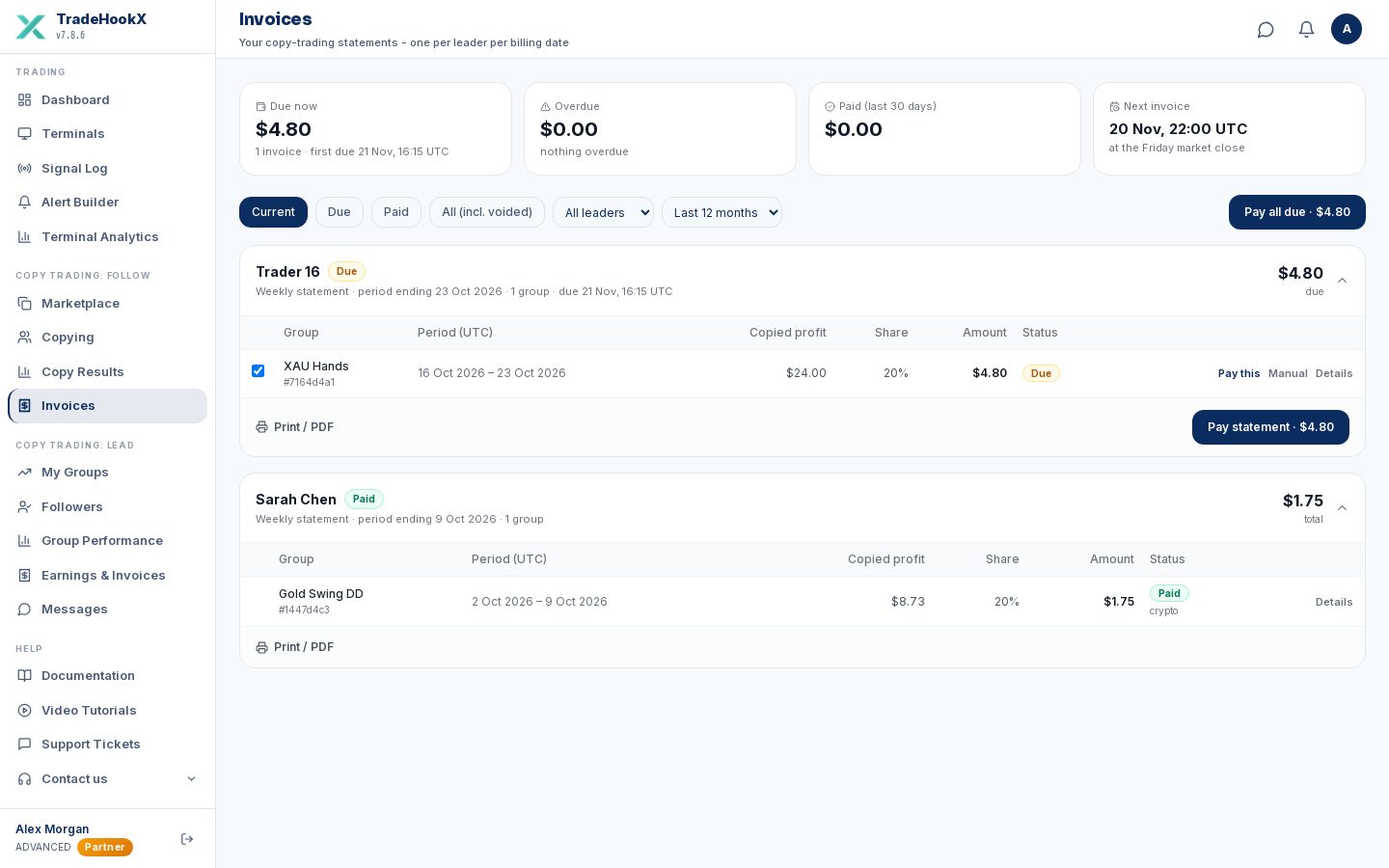
- •Summary at the top: total due, overdue, paid in the last 30 days, and the next invoice date.
- •Filters: open, due, paid, all; by leader; how many months back.
- •Pay statement / Pay selected / Pay all due - pay several invoices in one payment (one fee).
- •Pay this - pay one invoice. Details - every trade on it. Print - a printable version (save as PDF in your browser).
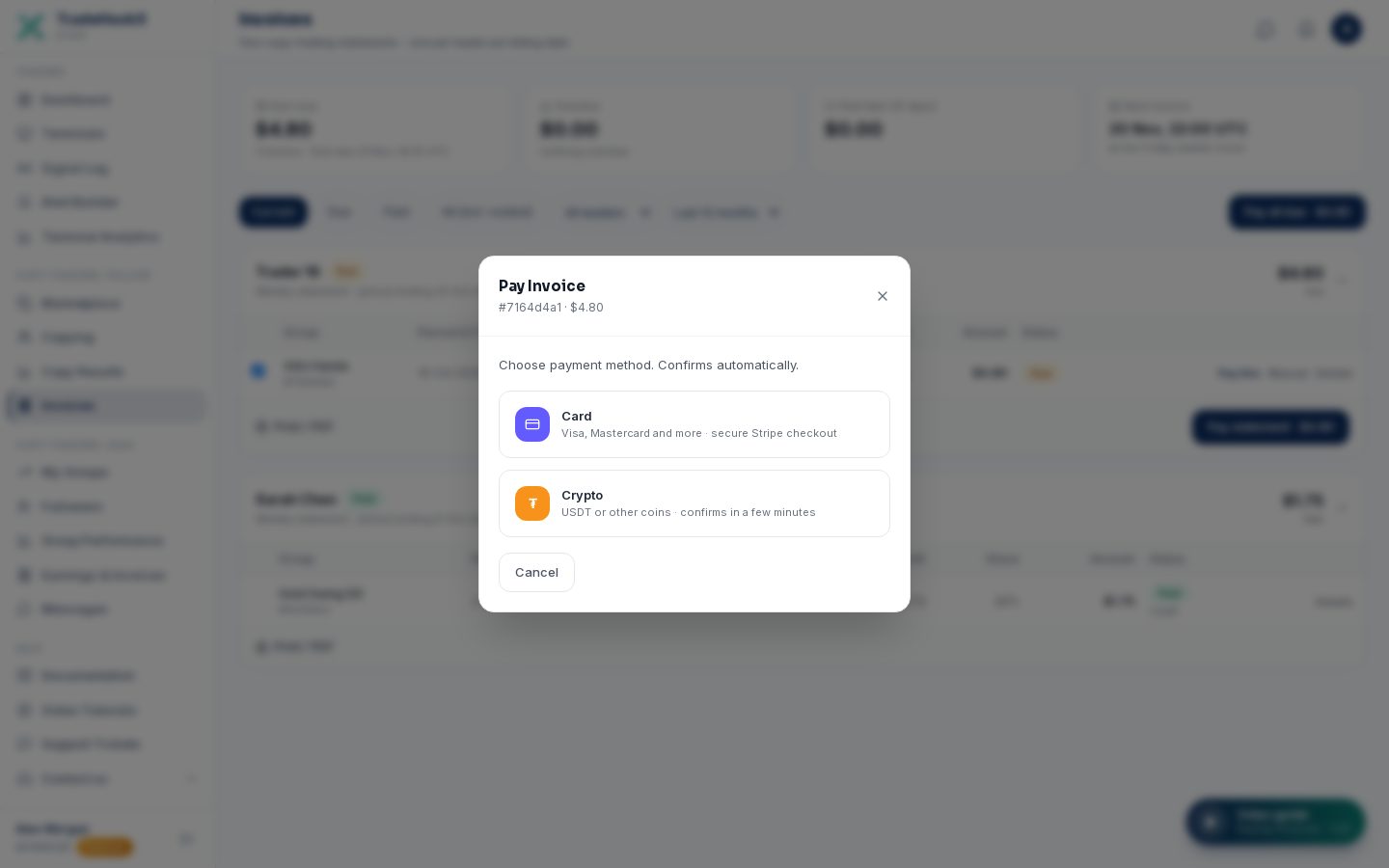
| Method | You pay | Good to know |
|---|---|---|
| Card | Invoice + 3.5% | Visa, Mastercard and more via Stripe's secure checkout. |
| USDT (BEP20) | Invoice + 2.5% | Cheapest. Works from about $0.10. Send exactly the amount shown on the payment page, on the BNB Smart Chain. |
| Other coins | Invoice + 3% | BTC, ETH, other USDT networks... converted automatically. Needs about $12 or more - for small invoices use USDT BEP20. |
| Manual (Upload proof) | Invoice only | You paid the leader directly (e.g. a bank transfer you agreed). Upload a screenshot - the leader confirms it and the invoice becomes Paid. |
Crypto: send the right coin on the right network
The payment page tells you exactly which coin, network and amount to send. Another coin or network (for example BNB instead of USDT) may arrive as a partial payment that has to be fixed by our team.For leaders: Copy Trading → Earnings & Invoices
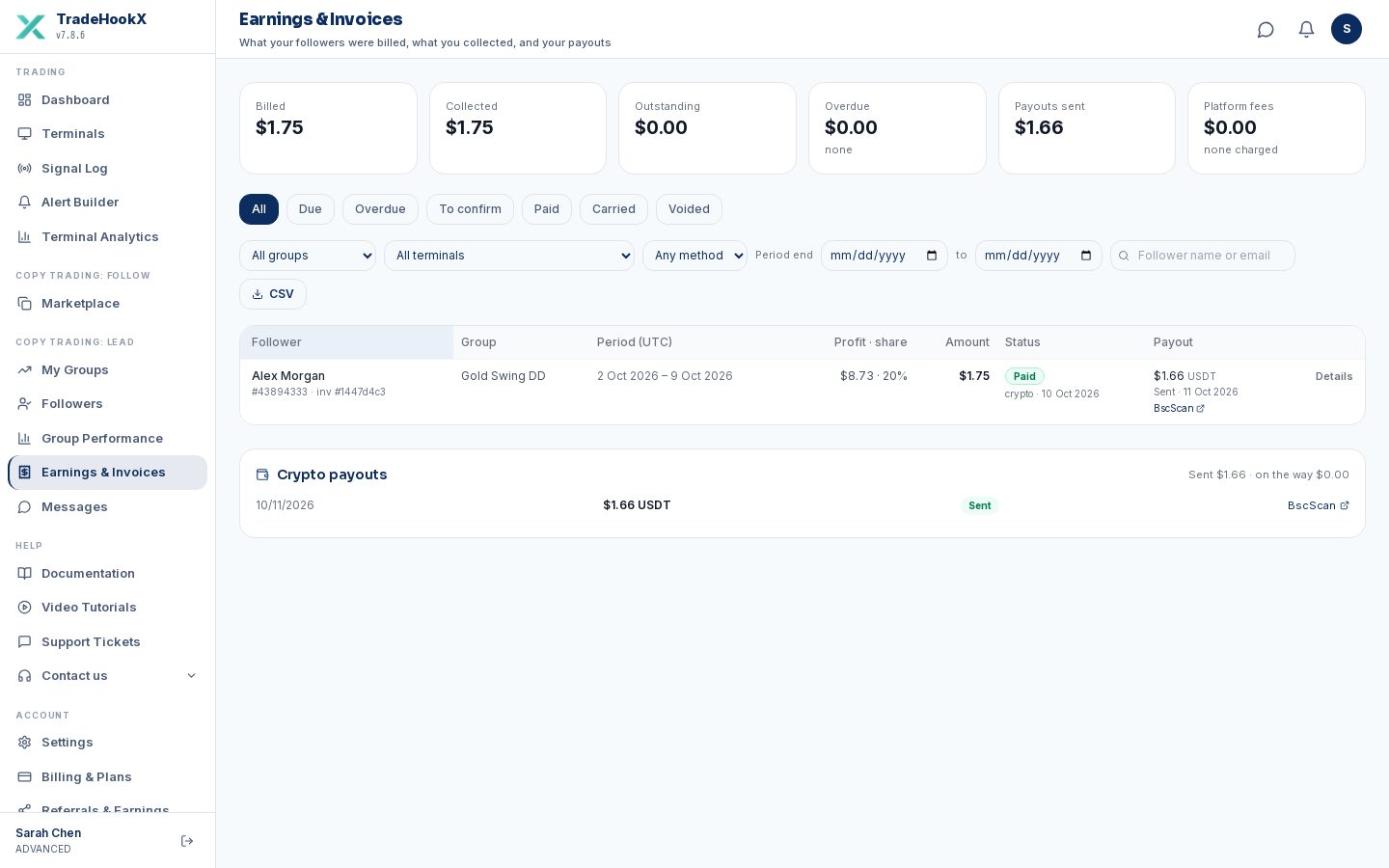
- •Tiles: due, overdue, collected, payouts sent.
- •Filters: group, terminal, follower search, status (due / overdue / under review / paid / carried / void), payment method and dates.
- •Payments to confirm: manual payments with the follower's proof - check your account, then Confirm (the invoice becomes Paid and the follower's copying resumes if it was paused for it).
- •Mark manual payment: record a payment you received outside TradeHookX.
- •Move to next invoice: an unpaid (due or overdue) invoice is added to the follower’s next invoice instead - for example when the amount is too small to be worth a payment. The follower pays nothing now, their copying resumes if it was paused for that invoice, and they are told. The next invoice is only issued after a period with copied profit, so for a follower who left the group the amount may never be billed. Undo move brings it back as due (48 hours to pay) until the next invoice is issued.
- •Payouts: every payout to you with its status and, for crypto, the transaction link.
How leaders receive the money
The money goes back the way it came in: card payments to your bank account, crypto payments to your USDT wallet. Set both up in Settings → Payouts.
| USDT (BEP20) wallet | Bank account via Stripe | |
|---|---|---|
| For payments made by | Crypto | Card |
| Setup | Add your USDT BEP20 address (starts with 0x). A new or changed address is usable after 48 hours, and you get an email / Telegram about it - a safety rule against stolen accounts. | Connect your bank in Stripe's secure form (bank details never touch TradeHookX). 160+ countries. |
| When | Minutes after the follower pays. | Per invoice, or as one weekly batch (Monday) - you choose. Weekly = one transfer fee instead of many. |
| Fees taken from your share | The crypto network's processing and transfer fees (cents). | Stripe's card fee and the transfer fee (about $1.50 + 1-2% cross-border / currency). Settings → Payouts shows the exact table and a worked example. |
| Example ($50 invoice) | Follower pays $51.25 → you receive about $49.7 in USDT | Follower pays $51.75 → about $44.97 arrives in a Pakistani bank |
- •The follower's fee (2.5% / 3% / 3.5%) is TradeHookX's service fee - it is not taken from your share.
- •TradeHookX charges leaders no platform fee at the moment.
- •Very large payouts (over $1,000 at once or $2,000 in a day) are checked by our team before they are sent.
- •A payout that cannot be sent (no address, bank not connected, network problem) waits and is retried - you see "Delayed - being handled" until it is sorted.